
Dynamic Data
Array Query
The Array query type takes PHP and returns a query array, which is as far as loop
queries go: anything WP_Query
accepts, built with functions, variables and conditions.
Writing an array query
- Select the loop element and open its Content tab.
- Set the query type to Array.
- Click the expand icon to open the PHP editor.
returnan array of query arguments.
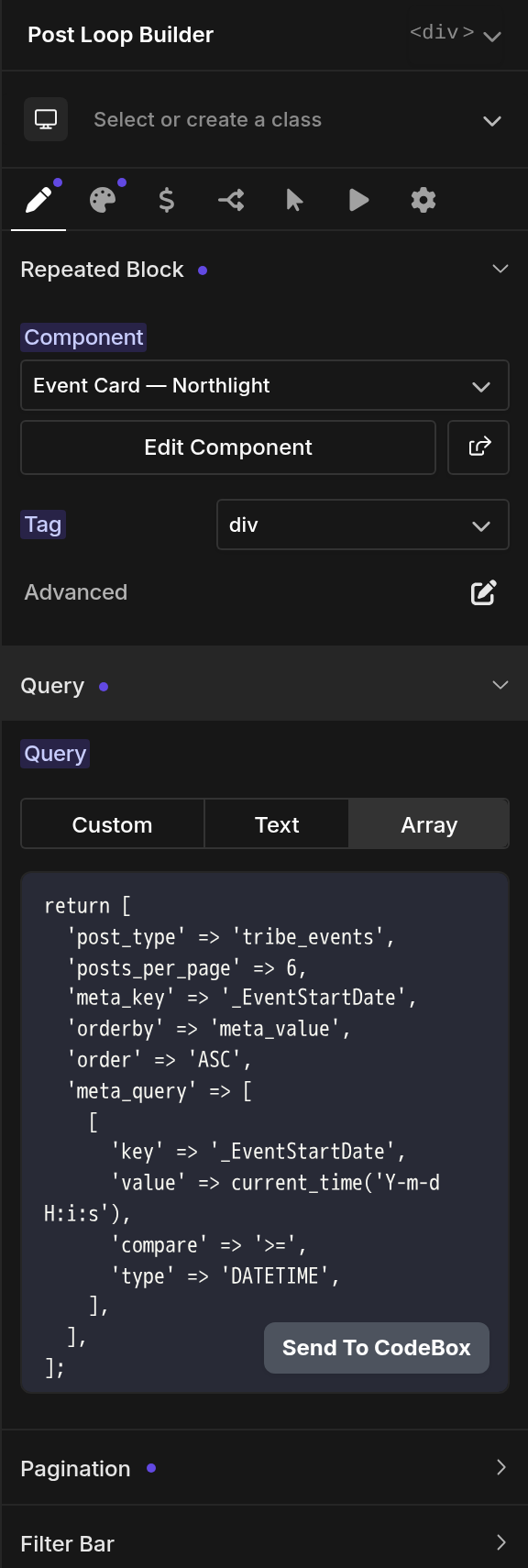
The Oxygen Support team can't help write these queries. The examples below cover the
cases that come up most.
Query examples
Show posts authored by currently logged in/viewing user
return [
  'post_type' => 'post',
  'author' => get_the_author_ID()
];
Show posts by author of currently viewed post
return [
  'post_type' => 'post',
  'author' => get_post_field( 'post_author' )
];
tax_query example, used on archive to get current queried term
return [
  'post_type' => 'product',
  'tax_query' => array(
    array(
      'taxonomy' => 'product_cat',
      'terms' => get_queried_object()->term_id
    )
  )
];
Make sure the date field returns in Ymd format
return [
    'post_type' => 'post',
    'order' => 'DESC',
    'orderby' => 'meta_value_num',
    'meta_key' => 'date',
    'meta_query' => array(
        'key' => 'date',
        'value' => date('Ymd'),
        'type' => 'DATE',
        'compare' => '>='
    )
];
Show only children of current post
return [
  'post_type' => get_post_type(),
  'post_parent' => get_the_ID()
];
Show posts based on ACF Taxonomy field
return [
  'post_type' => 'post',
  'tax_query' => array(
    array(
      'taxonomy' => 'category',
      'field'    => 'term_id',
      'terms'    => get_field('acftax'),
      'operator' => 'IN',
    ),
  ),
];
Show list of posts connected to the current post by Meta Box Relationship
return [
  'post_type' => 'lesson',
  'relationship' => [
    'id' => 'courses',
    'to' => get_queried_object()->ID
  ],
  'orderby' => 'meta_value',
  'meta_key' => 'select_2caoexzgghd',
  'order' => 'ASC'
];
Show posts from Search Query
return [
  's' => get_search_query()
];
Get the current Taxonomy and Term
$taxonomy = get_queried_object()->taxonomy;
$term = get_queried_object()->term_id;
return [
    'post_type' => 'any',
    'tax_query' => array(
        array(
            'field' => 'id',
            'taxonomy' => $taxonomy,
            'terms' => $term,
        )
    ),
];
Show All Other Posts That Have The Same Taxonomy Term(s) as the Current Post
$taxonomy_name = 'genre'; // enter the name of the taxonomy you would like to filter here
$taxonomy_field = 'slug'; // type the taxonomy field you would like to compare
$term_obj_list = get_the_terms( $post->ID, $taxonomy_name );
$terms_string = join(', ', wp_list_pluck($term_obj_list, $taxonomy_field));
return ['post_type' => 'any',
        'tax_query' => array(
          array(
            'taxonomy' => $taxonomy_name,
            'field' => $taxonomy_field,
            'terms' => $terms_string
          )
        )
       ];
Troubleshooting
A 500 error after editing the query
A 500 means a syntax or logical error in the PHP. Correct the query and refresh it to see
the output.