
Blog
Best Plugins for WooCommerce Product Import from XML

XML is widely used to exchange structured product data between systems and is especially valuable for product variations and field structures that don’t match WooCommerce’s standard format. For WooCommerce stores, XML feeds can simplify importing new products and keeping existing catalogs up to date.
WooCommerce’s built-in product importer accepts CSV files but cannot import products directly from XML.
Dedicated WooCommerce XML import plugins can read these files directly, map XML elements to product fields, and handle supplier-specific formatting without converting the files to CSV first.
In this article, we’ll compare four WooCommerce XML product import plugins, examining how well each handles supplier feeds in their original format.
Quick Comparison: Importing Products from XML into WooCommerce
Here’s how the XML product import plugins compare on the three things that matter: whether they read XML directly, how they handle supplier formatting issues, and what they cost.
| Plugin | XML Support | Handles Formatting Issues | Starting Price |
|---|---|---|---|
| WP All Import | Direct import with automatic field mapping and XPath | Interface options, XPath, and an embedded function editor | $169/yr |
| Woo Import Export | Direct XML import | Interface options only; no function editor | $229 one-time |
| Product Import Export for WooCommerce | Direct XML import | Pre-formatted files required; minor element edits only | Free / $69/yr |
| Import WP | Direct import of any XML structure | No on-the-fly data modification | Free / $59/yr |
To keep this comparison grounded in real-world feeds rather than vendor documentation, we ran the same product XML file through every plugin on a controlled WooCommerce test store. Below are the details:
Test File: A single XML file with nested product and variation elements, run through each plugin unchanged so every plugin faced identical conditions.
XML Stress Cases: Pipe-separated attribute values inside single elements, one serialized custom field, empty image elements on some products, variation child elements structured three different ways, and one broken image URL.
What We Checked After Each Import: Whether nested elements mapped to the right fields, whether galleries kept their order, whether the broken URL failed safely, and whether re-running the import created duplicates.
What Is the Best Plugin to Import WooCommerce Products from XML?
1. WP All Import

⭐
Rating: 4.7/5 on WordPress.org across 1,900+ reviews
💰
Pricing: From $169/year with unlimited installations
🎯
Best For: Automated XML product feeds with variations, images, and scheduled imports
WP All Import imports any WooCommerce product XML file automatically, with no manual mapping, no file reformatting, and no code. This matters because XML is the format automated supplier feeds arrive in, and an XML import that requires hours of setup defeats the purpose of automating the feed.
How Does WP All Import’s Automatic Setup Handle an XML Product Import?
Upload the file and select WooCommerce Products, and WP All Import analyzes the nested structure and maps every element to the correct product field on its own. A summary screen then reports the fields-mapped count and a confidence score, so you know the automatic mapping worked before anything runs.
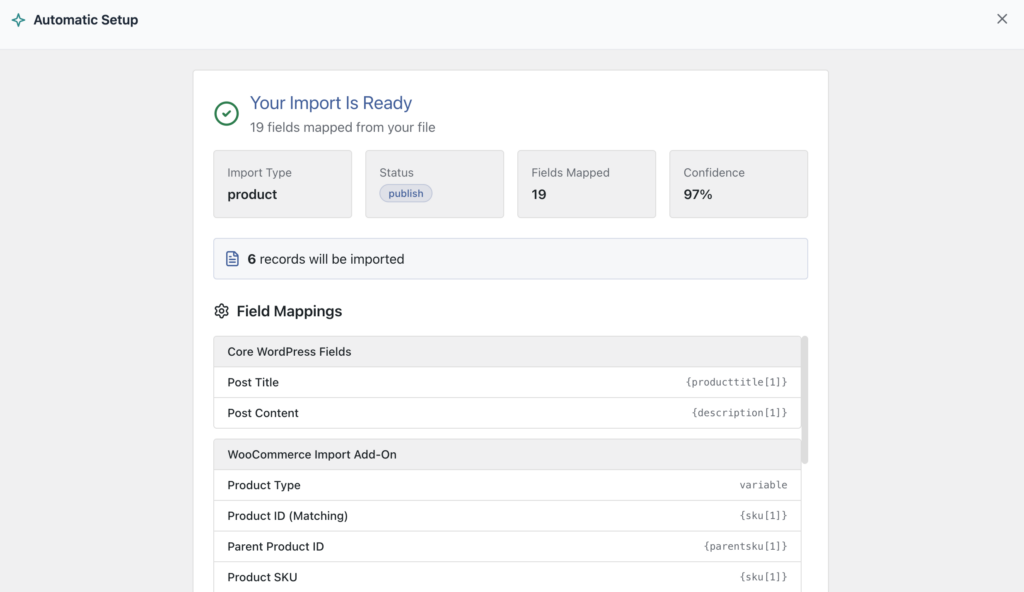
XML imports tend to be the work of stores automating their catalogs, and those files rarely behave. WP All Import’s Automatic Setup solves the mapping for clean files start to finish, and the same import opens into a visual template for fine-tuning when a file doesn’t cooperate. Every scenario below was handled inside the import itself, without editing the supplier’s file.
My Experience Using WP All Import for XML Imports
Product images are the clearest example. The Images section handles the scenarios that break other XML imports:
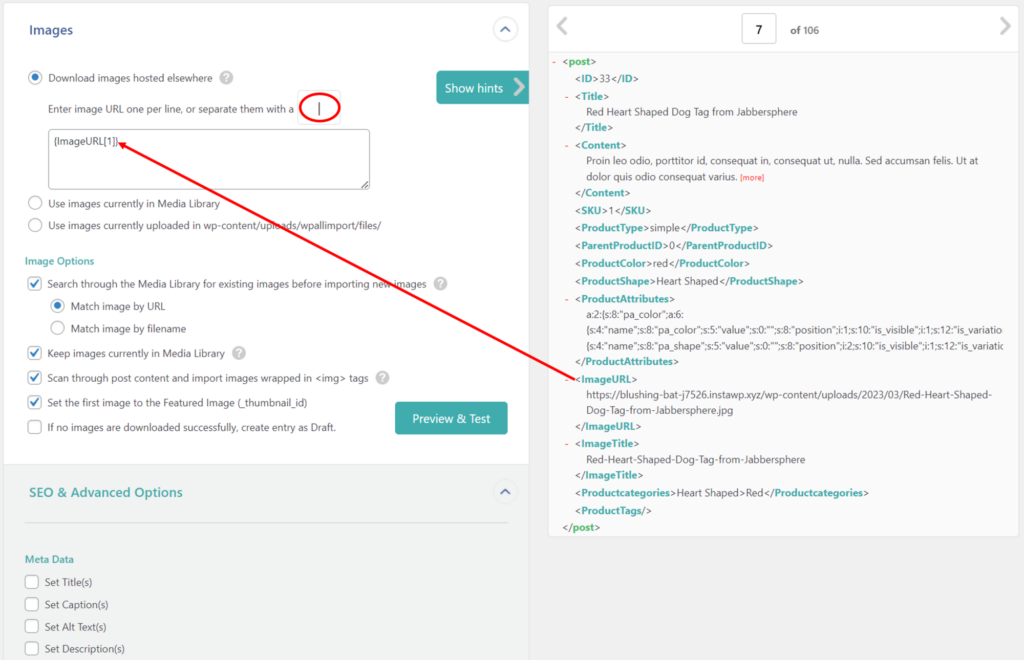
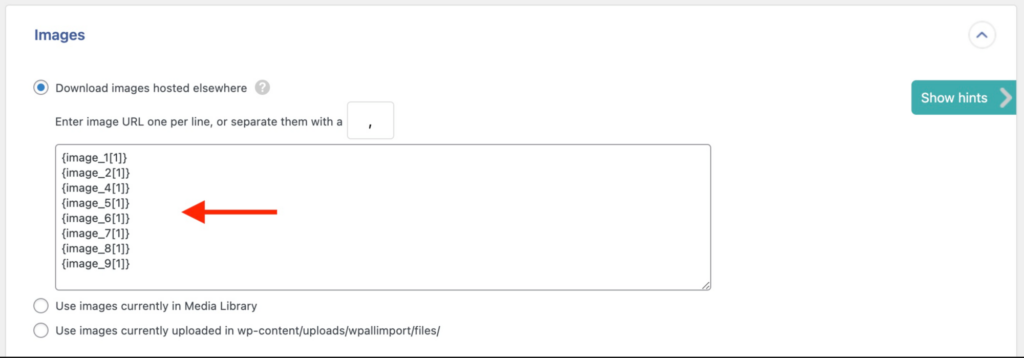
You can map the incoming imageurl element into the image field and specify the character used to separate individual images inside that element, should a product carry several. When each image lives in its own element, WP All Import consolidates them and automatically skips any element that’s empty for a specific product:
Variable products get the same treatment:
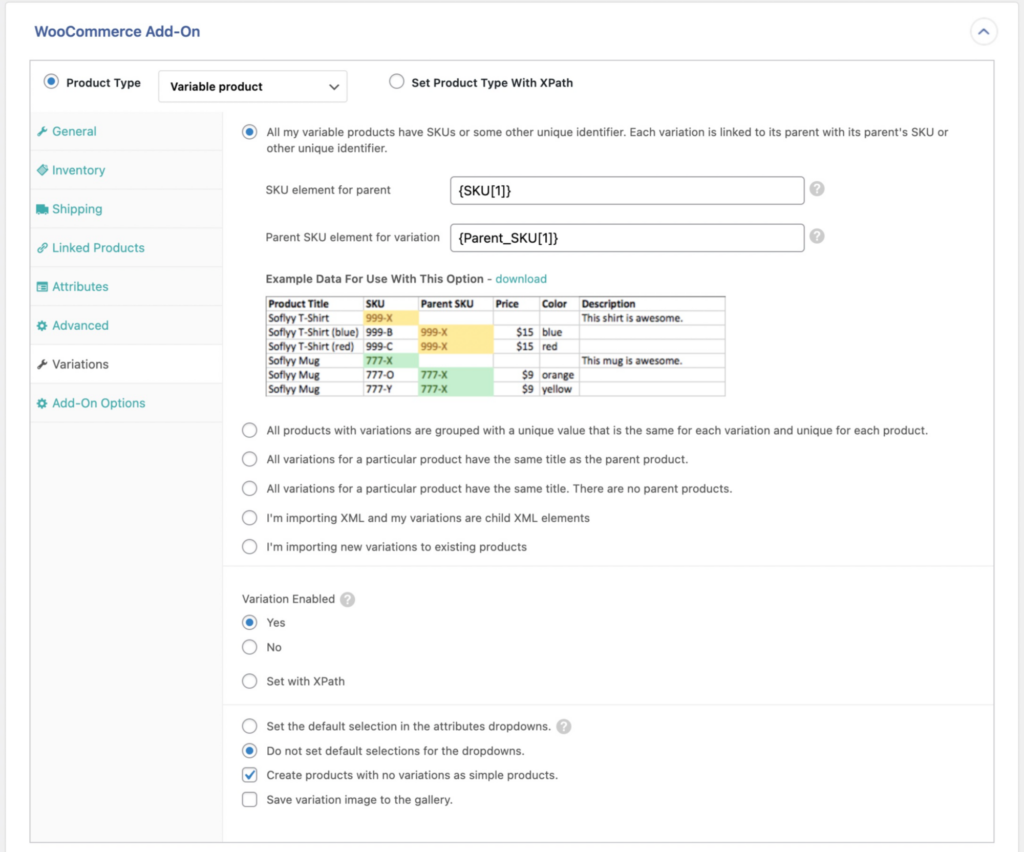
WP All Import offers options covering the six most common ways suppliers structure variation data in XML, with a visual sample to compare against your file so you can pick the right one. Variations can also be linked through XML child elements, one of four linking methods the plugin supports.
WP All Import also provides an embedded function editor for anything the standard options can’t resolve. If a supplier sends prices that need increasing across the board, you can create a simple function to adjust them on the fly:

You then apply this function inside any product import field:
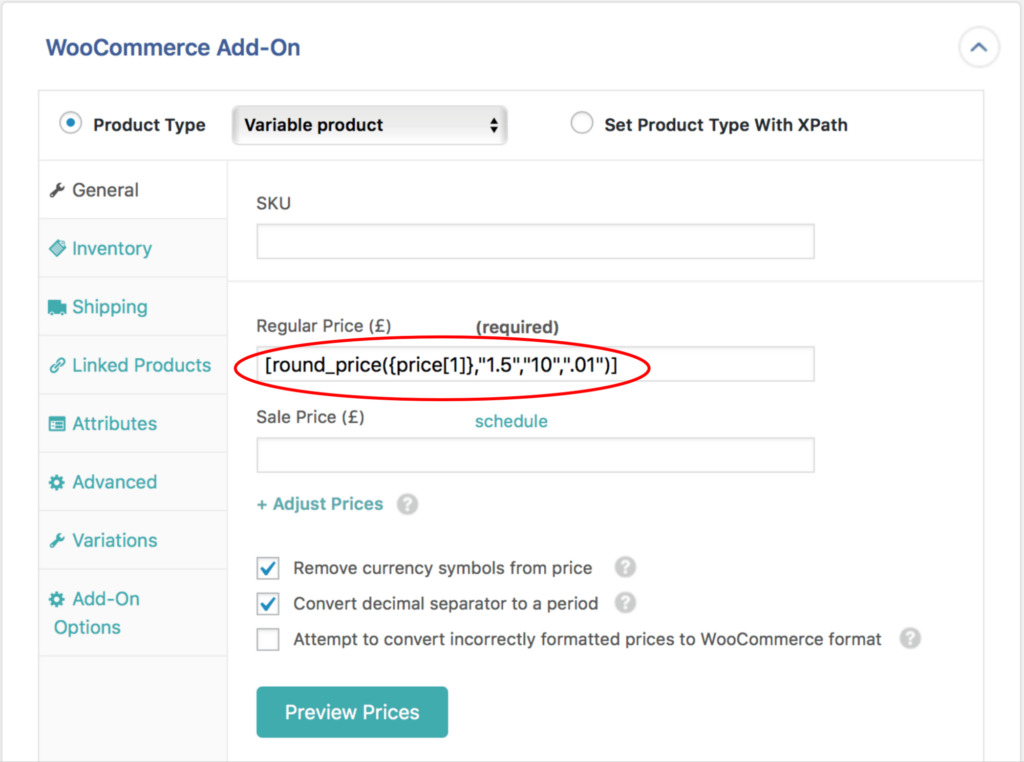
The same editor strips quote-wrapped URLs, reformats serialized data, and handles any other formatting oddity a supplier sends, all during the import itself.
What I Liked About WP All Import
- Automatic Setup maps nested XML structures and reports a confidence score before the import runs
- XPath support reaches elements at any depth of the file, including variation data nested inside parent nodes
- Images import from any element or external URL, with galleries, featured images, and alt text handled in one pass
- Four variation linking methods cover the six most common supplier structures
- Scheduled imports keep recurring XML feeds updated without manual runs
What I Didn’t Like About WP All Import
- The function editor and XPath take a session to learn, though Automatic Setup means clean supplier files never touch them
Pricing
WP All Import is available as a free plugin from WordPress.org with limited features. The Pro version starts at $169/year for the WooCommerce Import Package with unlimited installations.
Recommended For
For automated feeds with variations, images, or nested structures, WP All Import imports the file as it arrives, and for scheduled feeds, it’s the only one that re-runs without anyone opening the file.
2. Woo Import Export

⭐
Rating: No available ratings on popular third-party review platforms
💰
Price: $229 one-time for 1 site
🎯
Best For: XML imports handled manually through interface options
Woo Import Export imports WooCommerce products directly from XML files and resolves images, variations, and serialized custom fields through interface options rather than automatically. It ranks #2 on this XML product import list because the interface covers the common XML cases, and that is where its handling ends.
Image elements are covered first. The image settings include separator characters for multi-value elements, so a single element holding several image URLs can be split during the import:
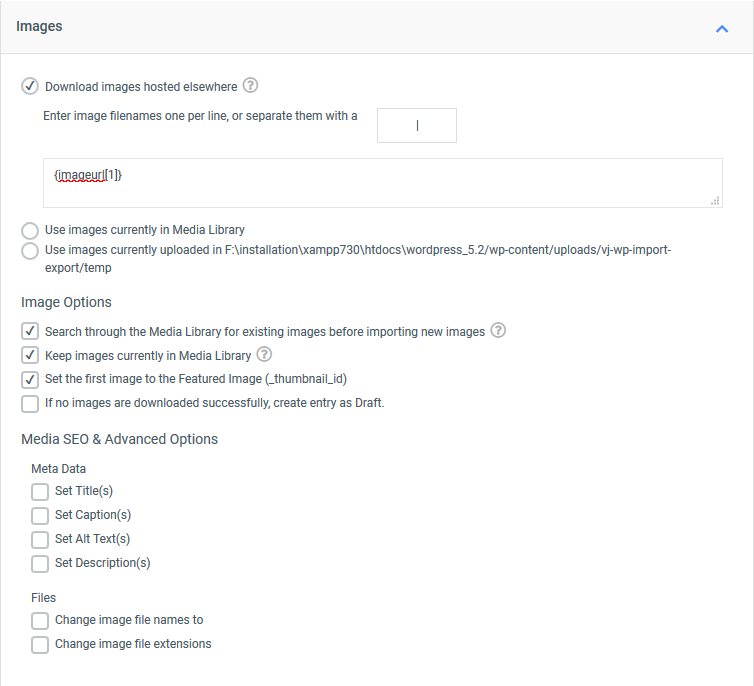
Variable products are supported as well, with dedicated settings for mapping child variations to their parents.
My Experience Using Woo Import Export for XML Imports
Serialized custom fields are handled through the interface. It allows a custom field that holds multiple values in a single XML element to be broken into key/value pairs during the import.
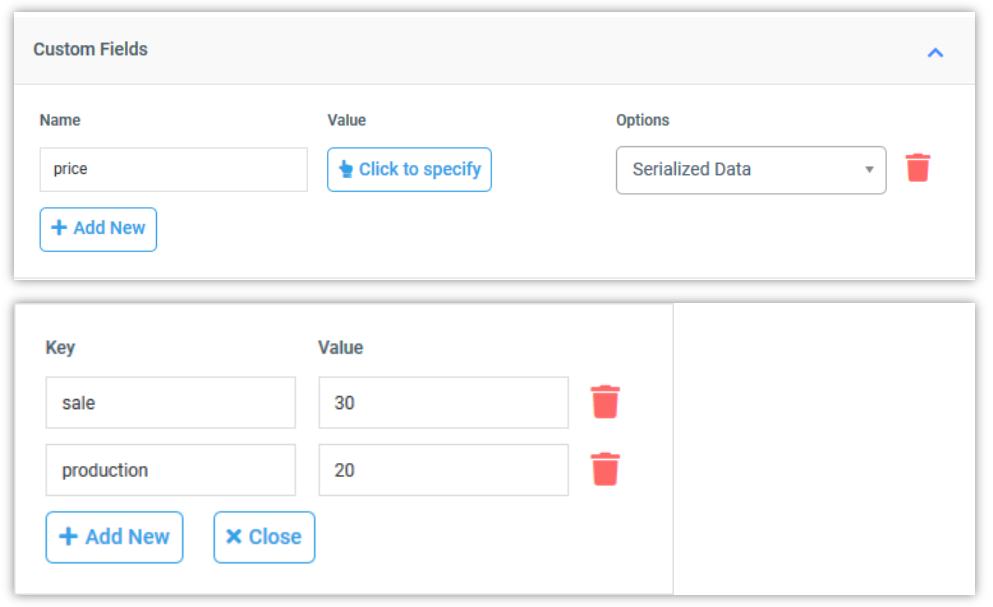
In my test file, the serialized custom field mapped cleanly on the first run.
What I Liked About Woo Import Export
- Imports XML files directly, with no CSV conversion step
- Image elements, separator characters, and variation data all handled through interface options
- Serialized custom fields break into key/value pairs inside the import, not beforehand
What I Didn’t Like About Woo Import Export
- There’s no embedded function editor, so any XML issue that the interface options can’t solve has no fallback and the file has to be edited by hand
- It imports WooCommerce data, but not all WordPress data types, such as posts, pages, and custom taxonomies
Pricing
There’s no free version of Woo Import Export available. The Pro version with advanced features costs $229 for a single site license.
Recommended For
Woo Import Export is the right pick when your XML comes from a source you control and the file structure stays consistent from feed to feed, which is rarely the case with XML product import.
3. Product Import Export for WooCommerce
⭐
Rating: No available ratings on popular third-party review platforms
💰
Price: Free core plugin; Pro from $69/year for 1 site
🎯
Best For: Requires XML formatted to match your store’s field structure
Product Import Export for WooCommerce imports product XML files directly through a free core plugin. What it doesn’t do is adapt to your file: the XML has to match your store’s field structure before the import starts, because the plugin offers no substantial way to modify incoming data during the import.
That strictness shows up in the mapping. Product Import Export for WooCommerce does not offer automatic mapping that reads the XML and maps the structure for you. Each attribute, image, and variation element is located in the file and assigned to its field one at a time, so setup time grows with the size and depth of the feed. In a nested supplier file, elements buried inside parent nodes have to be found and mapped individually.
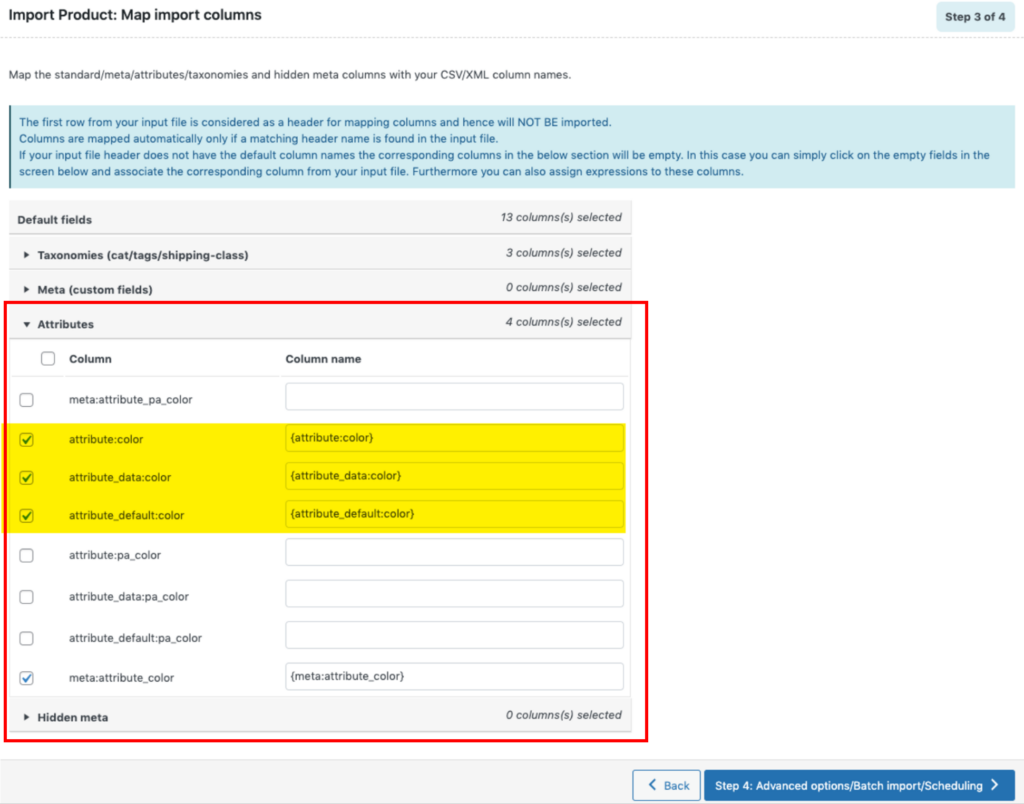
My Experience Using Product Import Export for XML Imports
The serialized custom field in my test file showed the pattern clearly. WebToffee’s own documentation states: “It is to be noted that the system accepts metadata only in the same formats as it is stored in the database.”
In practice, that means the element gets reformatted before the import, in the file itself, which breaks the automation an XML feed is supposed to provide.
Variation mapping follows the same requirement. WebToffee’s documentation states: “In the CSV file, make sure that you use both SKU and Parent_SKU in the CSV for a variation. The child products should always have a Parent_SKU.”
The statement references CSV files, and the same applies to XML: child variations must carry a Parent_SKU, with the file structured for it before the import runs.
Image handling covers external URLs and filenames, with fewer of the multi-value and empty-element options that let an importer process supplier files untouched.
What I Liked About Product Import Export for WooCommerce
- Imports XML files directly, with a free core version available on WordPress.org
- Attribute elements map to product fields through the interface
- Handles all standard WooCommerce product types and custom metadata columns
What I Didn’t Like About Product Import Export for WooCommerce
- Mapping is manual for every field, with no automatic setup
- Metadata is accepted only in the format it’s stored in the database, per the plugin’s own documentation, so non-conforming elements must be fixed in the file beforehand
- Variations require both SKU and Parent_SKU in the file, with nothing in the plugin to handle a structure that doesn’t anticipate it
Pricing
Product Import for WooCommerce has a free version that can be downloaded from WordPress.org. The pro version starts at $69/year for a single site license and includes the advanced features.
Recommended For
Product Import Export for WooCommerce makes sense when you generate the XML yourself, such as exporting from another store or system you run, because then the field structure is guaranteed to match.
4. Import WP

⭐
Rating: No available ratings on popular third-party review platforms; 5,000+ active installs on WordPress.org
💰
Price: Free core plugin; Pro from $59/year for 1 site
🎯
Best For: XML or CSV imports mapped through visual field selection
Import WP doesn’t ask your XML to follow any schema. The plugin reads any XML structure as-is, and a visual data selection tool maps elements from the file’s tree to product fields, whether they sit at the top level or nested inside parent nodes.
What it doesn’t do is read the file for you. Every element is located and mapped by hand, there’s no automatic setup step, and nothing verifies the mapping before the import runs. For a flat product file, that’s a short task. For a nested supplier feed with attributes, images, and variations, the selections add up quickly.
My Experience Using Import WP for XML Imports
In my test file, the top-level product elements mapped without trouble, and the selection tool reached the variation data nested under each product. Variations themselves work in two passes: the parent products import first, then the child elements are linked to them through a parent field. The imageurl element mapped like any other field, though the multi-value and empty-element handling available elsewhere is absent here, so an element holding several URLs needed the file cleaned up first.
What I Liked About Import WP
- Reads any XML or CSV structure, with no formatting requirements for the file
- The selection tool maps elements from anywhere in the XML tree, including nested nodes
- A free WooCommerce add-on covers simple, variable, grouped, and external products
What I Didn’t Like About Import WP
- Every element is mapped by hand, with no automatic setup and no verification before the import runs
- There’s no on-the-fly data modification, so multi-value and misformatted elements have to be fixed in the XML first
- Scheduled imports and custom field mapping require the Pro upgrade
Pricing
Import WP is free to download from WordPress.org, and the free version covers core WordPress data along with product imports through a free WooCommerce add-on. Import WP Pro costs $59/year for a single site license and adds custom post types, custom fields, scheduled imports, and premium support.
Recommended For
Import WP fits stores importing flat, consistent XML files, where a handful of manual selections covers the whole feed.
Which Plugin Should You Use to Import Products from XML into WooCommerce?
WP All Import is the only product XML import plugin on this list that combines Automatic Setup, XPath access to nested XML elements, four variation linking methods, and an embedded function editor in a single plugin. With it, supplier XML imports as it arrives: elements map to the correct product fields automatically, and scheduled runs keep recurring feeds current without manual work.
Each of the other plugins has clear limitations. Woo Import Export’s interface covers images, variations, and serialized fields, and stops when an element arrives in a form its options don’t anticipate. Product Import Export for WooCommerce needs the XML to match your store’s structure before the import starts. Import WP reads any structure but maps every field by hand.
If your product XML arrives on a schedule, comes from a supplier you don’t control, or contains variations and images, WP All Import is the plugin that will still be doing the job a year from now.
WooCommerce Product Import from XML – FAQs
Can WooCommerce import products from an XML file?
The built-in importer is limited and accepts CSV files only. WP All Import imports product XML files directly, including nested structures, and its Automatic Setup maps the XML elements to WooCommerce product fields for you.
How do I import products from an XML file into WooCommerce?
- Upload your XML file in the All Import › New Import screen in WP All Import
- Select WooCommerce Products as the import type
- Let Automatic Setup map the XML elements to product fields, then review the mapping summary
- Run the import to bring the products, images included, into your store
What is the best plugin to import XML products into WooCommerce?
WP All Import is the best plugin to import XML products into WooCommerce. Its Automatic Setup maps nested XML elements to product fields automatically, XPath support reaches data at any depth of the file, and the embedded function editor resolves XML formatting issues without custom code.
How do I import product images from an XML file into WooCommerce?
In WP All Import, map the image elements in the Images section of the import template. Images can arrive as URL elements, multiple URLs in one element separated by a character you choose, or separate elements per image, which the plugin consolidates while skipping empty ones.
How do I handle multiple values inside a single XML element?
Set a separator character in WP All Import so the plugin splits the element’s contents into individual values, such as separate gallery images or attribute terms. For values that also need reformatting, like quotes around URLs or serialized data, the function editor cleans them during the import.
Further Reading
Get Oxygen
Build it your way with Oxygen.
$199.50
once — unlimited sites, no renewal
Not per year, not per site, not per seat. 60 day money back guarantee.