Best WooCommerce Bulk Edit Plugins
WooCommerce is a powerful e-commerce platform. Its core technologies provide a solid foundation for pretty much any online store. However, it does not try to be all things to all online retailers. To provide that kind of flexibility, it relies on thousands of extensions and plugins.
One area where WooCommerce requires help is bulk editing its data. Tapping into core WordPress features, WooCommerce does offer some basic bulk editing capabilities, which we’ll describe first. But beyond that, you’ll need a plugin.
There are many plugins that can help you bulk edit WooCommerce products. This is because products require bulk updates more often than any other data type, especially for stock and price fields. But in this article, we’re going to emphasize plugins that can help you do more than bulk edit just products. We’re taking this approach for two main reasons:
- Although WooCommerce products are more likely to require bulk edits than other data types, they are not alone. Anyone who has ever made changes to their order or shipping processes knows that bulk edits are sometimes required there, too, so it makes very little sense to focus exclusively on a one-trick pony like a bulk edit tool for products.
- Many store owners who bulk edit their product data, especially stock and price fields, are actually using the wrong tool and would be much better off implementing automated updates.
Built-in WooCommerce Bulk Edit Tool
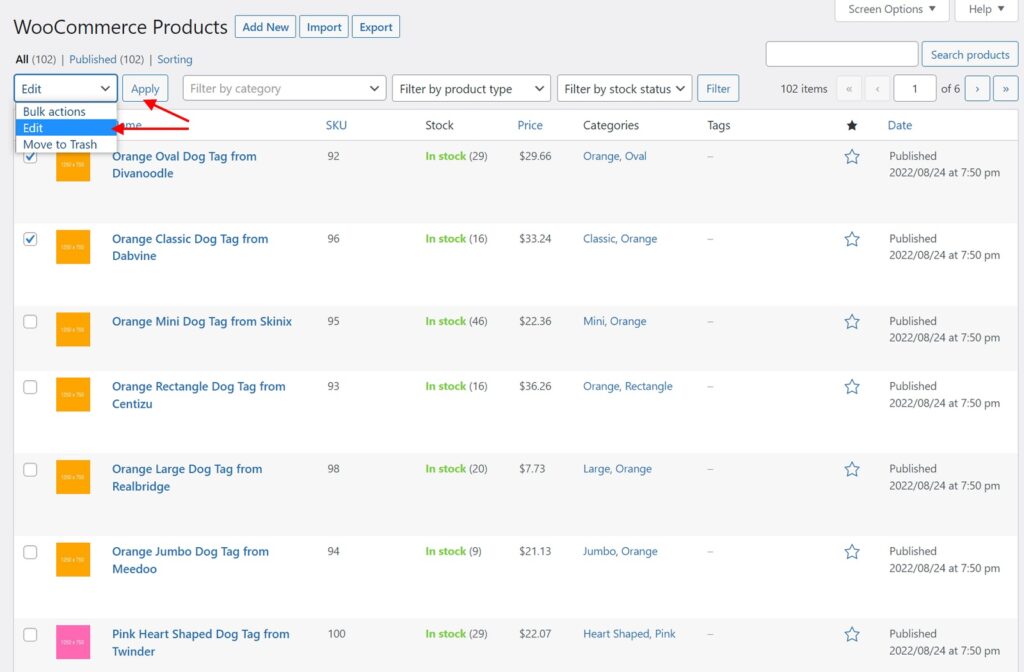
The built-in WooCommerce bulk edit tool is found at Products > All Products. You can access it by selecting products and choosing Edit from the Bulk Actions menu, then clicking the Apply button:
This will bring up the following edit pop-up screen:
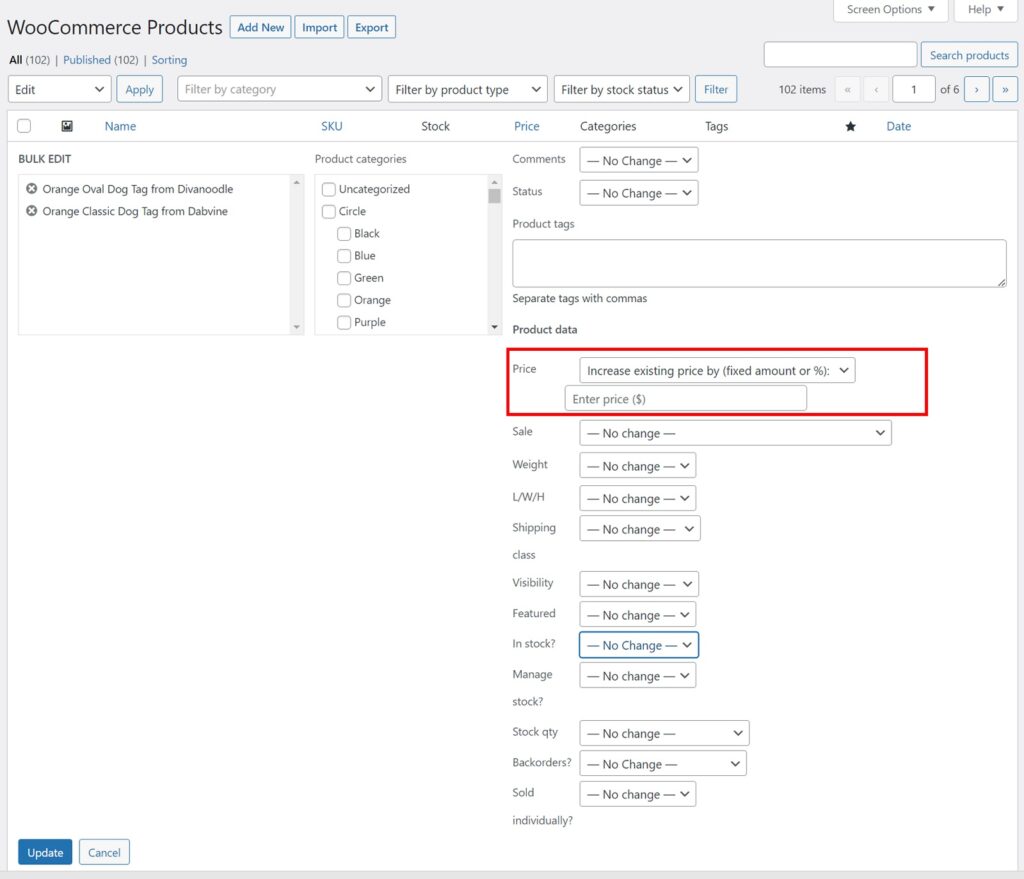
Whatever changes you specify here are then applied to the selected products when you click the blue Update button in the lower-left corner.
Some of the options in this pop-up screen are quite useful, such as the one highlighted by the red rectangle in the above image, which lets you adjust the product price by either a fixed amount or a percentage.
Others are simple value selections. For example, you can set the In stock? field to one of its three allowed values for all selected products:
- In stock
- Out of stock
- On backorder
Notice, however, that these are all rather simple changes. For example, there is no opportunity to apply conditional logic or automated updates. Speaking of automated updates…
The Difference Between Bulk Editing Versus Automated Updates
Changes to WooCommerce data generally fall into one of two categories:
- You have access to a data file that contains the changed data.
- You don’t have access to such a file.
In the absence of a data file, you have no choice except to apply the changes manually, even if you do that with the help of a bulk editing tool. But if you’re receiving changes via a data file — for example, if a supplier sends you a file with updated information on their products — a bulk editing tool is the wrong choice. You should be using an update process that can be carried out with a single click or even executed automatically on a schedule.
In this next section, we’ll describe the plugins capable of handling these scenarios, starting with the most powerful WooCommerce bulk edit and update tool on the market.
The Best WooCommerce Bulk Edit and Update Plugins on the Market
WP All Import/Export
Why do we consider this the best WooCommerce bulk edit and update tool available?
With regard to bulk edits, it allows you to use the same simple process for every type of WordPress and WooCommerce data:
- Use WP All Export to export the data that you want to bulk edit.
- Edit the exported data in your favorite spreadsheet package. Spreadsheets are ideal for performing bulk edits because you can use convenient features like search-and-replace, copy-and-paste, advanced filters, and even macros. There are no bulk editing tasks that you can’t perform in a spreadsheet. And if you have something really tricky that you need to do, there’s no shortage of online help.
- Use WP All Import to import your changed data. Normally, importing data — especially complex data like WooCommerce products — can be a time-consuming process. But WP All Export has a cool feature that turns the whole thing into a few clicks: it remembers your export file structure. You just tell it to import the same file that you previously exported, and it will map all your import fields for you. Because of this, you can apply your bulk edits in seconds!
Granted, there are some very specific bulk edit tasks that you can perform more quickly using made-for-purpose plugins, such as changing product prices in a tool that has been specifically designed for WooCommerce product bulk edits. But consider the pros and cons. At most, you’ll save a few minutes on these tasks. But the moment you need something outside the supported changes, you’ll find yourself searching for a new solution and then having to purchase and learn that solution.
With WP All Export/Import, you’ll never have to do that. You can use the same exact solution for every conceivable WordPress and WooCommerce bulk edit.
But there’s an even bigger advantage to using these plugins. Nobody really wants to perform bulk edits, especially if they involve data being sent to you from elsewhere. In that case, it’s better to set up a process to automatically update your data.
With WP All Import, you can:
- Create and save an import process to apply bulk edits.
- Arrange for your supplier to send update files to a specified location.
- Set up a trigger so that an update process runs automatically upon receiving a new file (or have the update run on a predetermined schedule).
- Get automatically notified whenever a new update process has been run.
Universal and ultra-powerful — that’s a combination that’s hard to beat!
Price: $199 lifetime to bulk edit all WooCommerce data, $299 to bulk edit everything and anything.
WooCommerce Products Spreadsheet by WP Sheet Editor
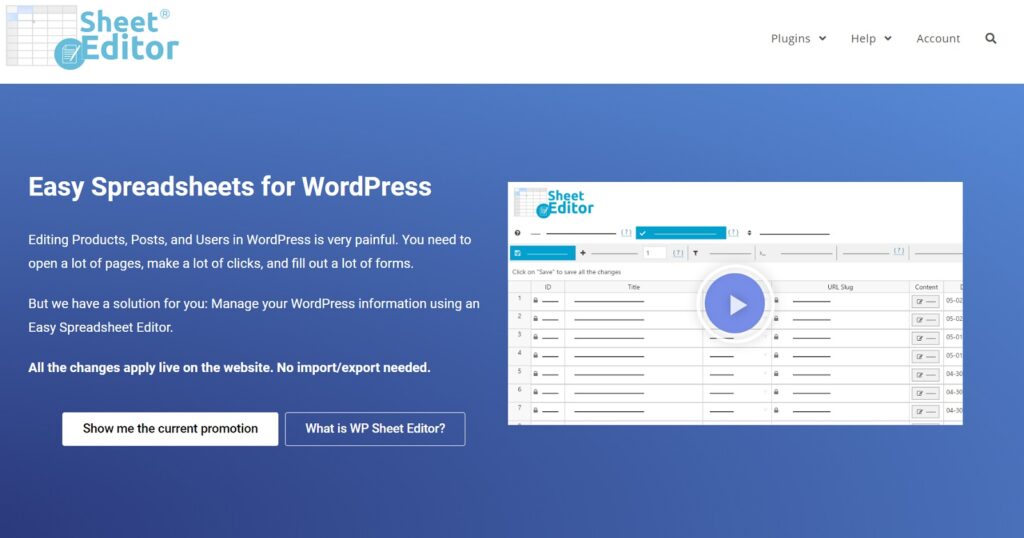
This plugin is one of our favorite interactive bulk editors. Like most of the plugins in this category, it is essentially a spreadsheet built into WooCommerce but with product-specific functionality. This makes it quite intuitive for manual interactions. You just install the plugin, and you immediately gain access to the spreadsheet:
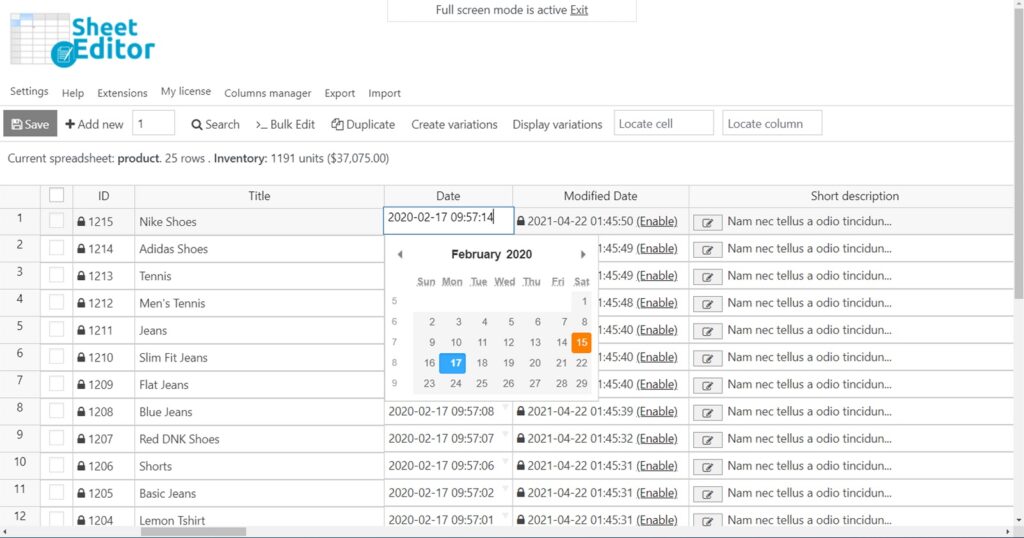
Don’t let the simplicity of the interface fool you. The paid version of the plugin allows you to duplicate products, bulk edit them, and create variations. The bulk edit feature includes the ability to replace values in any field, increase/decrease product prices or stock values, and apply mathematical formulas to any numeric field.
The plugin also has a limited capacity to import and export products.
Why do we rank this plugin so high on our list when we said we would highlight plugins that allow you to bulk edit more than products? Because this plugin is actually part of a family of plugins that lets you bulk edit all WooCommerce data types and some WordPress data types.
Granted, it’s not as powerful as the combination of WP All Export and WP All Import. You can’t set up automatic updates or incorporate conditional logic into the process. And if you add together the cost of all the WP Sheet plugins, even when bundled, they will exceed the price of WP All Import/Export’s all-inclusive package. But for someone looking to perform periodic updates to just a couple of data types, this is a viable solution.
Price: $49 to $98 per year, or $119 to $239 lifetime, depending on the status of the current promo. Alternatively, you can buy all of WP Sheet Editor’s plugins for $399 to $499 lifetime, again depending on the promo.
Smart Manager for WooCommerce by Store Apps

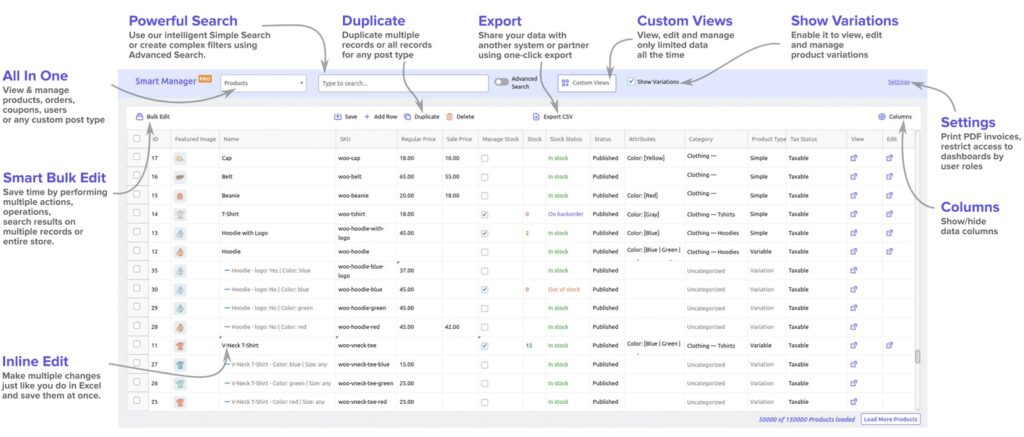
This plugin is very similar to the preceding one. It also uses a spreadsheet-like interface, provides a number of functions beyond just bulk edits, and allows you to bulk edit more than just WooCommerce products. In fact, we might have swapped places for these two plugins, except that Smart Manager currently lacks any data import capabilities.
The following picture does a good job of describing the plugin’s functionality (right-click the image and open it in a new tab for better readability):
The bulk edit tool itself is convenient for typical editing tasks:
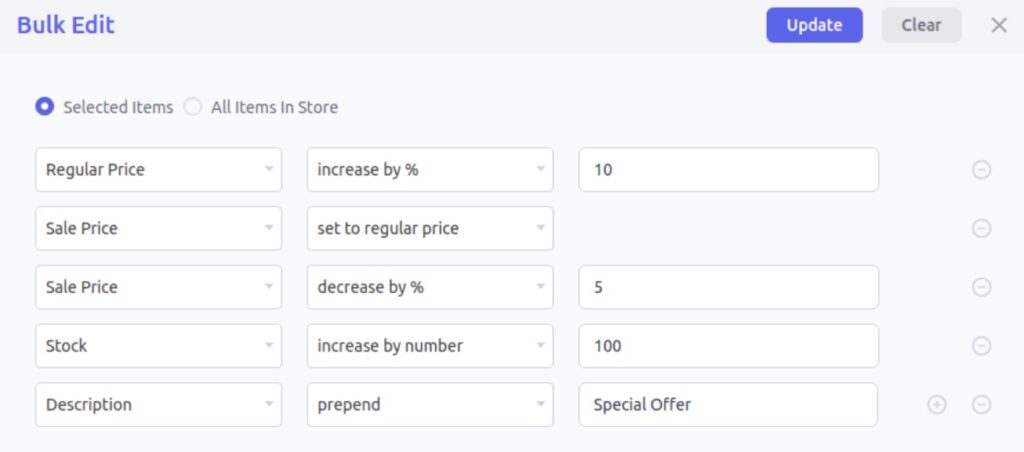
But, as with WP Sheet Editor, you’ll struggle with more complicated tasks like applying conditional logic.
You can export data using Smart Manager, but again, you’ll quickly run into limitations. For example, if you’re trying to export your data to an external system that has strict file layout and formatting requirements, you have very little fine control over these issues. Instead, you’ll have to output your data in CSV and then manually beat it into conformance.
Finally, without data import capabilities, Smart Manager lacks the ability to even import new products, let alone support any kind of automated update process.
This may not seem like that big a deal if your most pressing need at the moment is simply to bulk edit existing products. But the moment a supplier offers you a data file that already contains a set of product updates, you’ll be kicking yourself that you didn’t opt for a more comprehensive solution.
Price: $199 per year or $549 lifetime.
Bulky WooCommerce Bulk Edit Products
The capabilities of these plugins begin to narrow at this point in this list. In addition to WooCommerce products, Bulky also allows you to bulk edit WooCommerce orders and coupons, but not customers. It does have a sister product — WPBulky WordPress Bulk Edit Post Types — that allows you to edit posts, pages, media, etc. But with only 100 installs and 1 one-star rating at WordPress.org/plugins, it’s hard for us to take it seriously at this point (it’s relatively new, so we need to give it more time to succeed or fail in the marketplace).
Bulky uses the same kind of embedded spreadsheet interface as the other manual bulk edit plugins have done to this point:
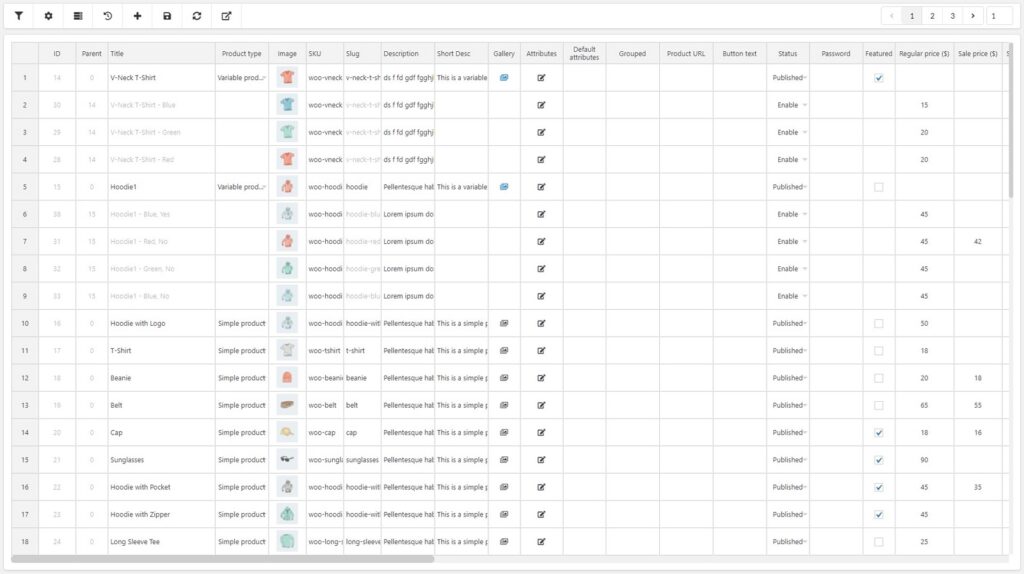
It has strong row and filter capabilities so that you can isolate the products and product columns that you wish to edit.
It provides some pretty decent bulk edit features, such as:
- sorting;
- range selection;
- copy and paste;
- find and replace;
- duplication;
- a drag-and-drop copy/fill action;
- undo;
It also allows you to save your filters, and it records a history of your edits.
So, all in all, not a bad product/order/coupon editor.
But what if you need to bulk edit WooCommerce customers, custom post types from 3rd-party themes or plugins, or anything else from WordPress? You’ll be looking for a new solution.
And what about processing supplier updates? With no import capacity (let alone scheduling, Zapier integration, etc.), you’re out of luck there, too.
Price: $39 per year.
PW WooCommerce Bulk Edit
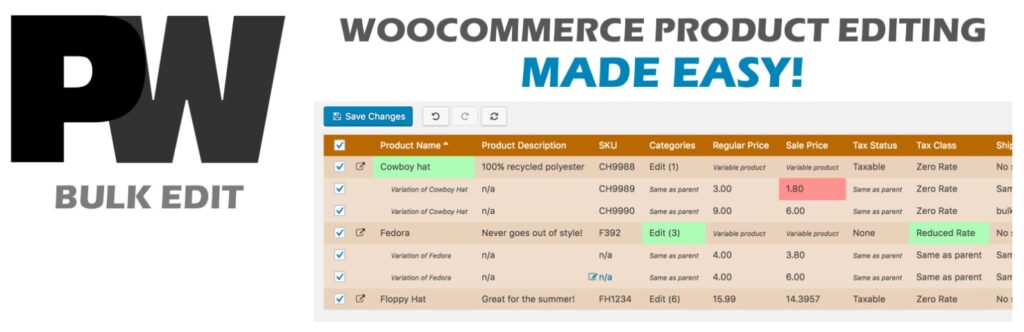
As a pure manual bulk editor, this one ranks up there because of its smart features and interface design. It’s only this far down the list because it only lets you bulk edit WooCommerce products, which means you’re more likely to need another bulk editing tool at some point.
But we do like some of its features, including:
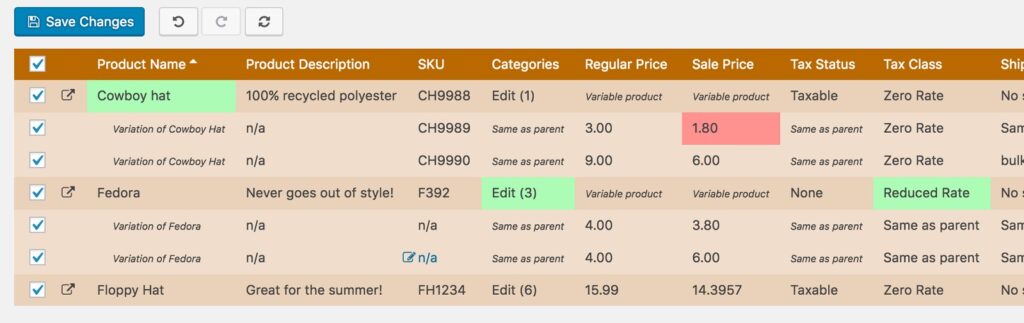
- a live preview of pending changes before you commit them, as well as the ability to undo those changes;
- the ability to use regular expressions for searching and replacing text values; this isn’t quite as good as conditional logic, but it narrows the gap;
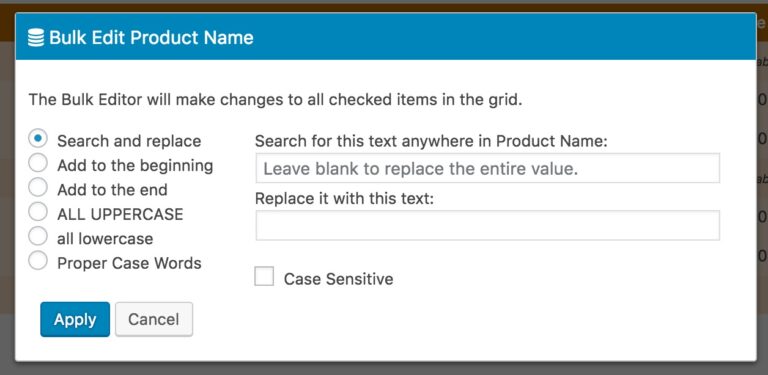
- context-sensitive bulk edit screens;
- a good approach to product variations;
- the ability to set or clear product images in bulk;
Here’s a look at the preview screen. Note how things like price drops are highlighted in red:
And here’s a look at a bulk edit screen for the Product Name field:
…versus one for the Sale Price field:
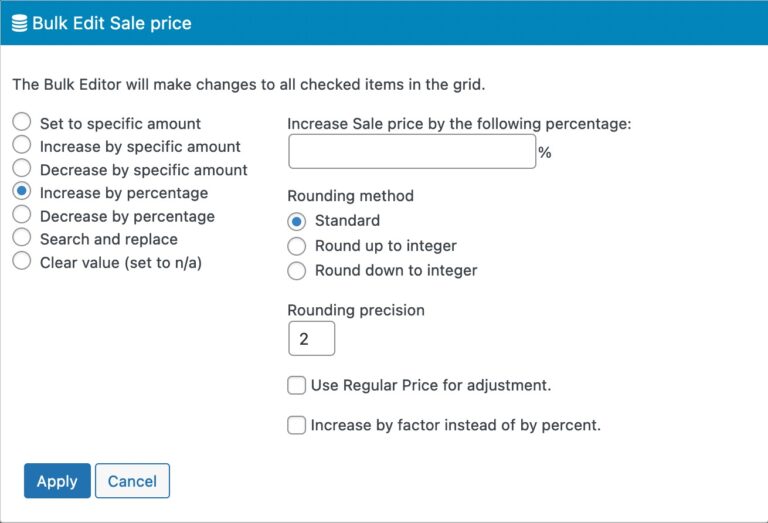
These are not by any means revolutionary in the WooCommerce bulk edit landscape, but it’s clear that the programmers of this plugin put considerable thought into its design.
PW Bulk Edit also provides a rudimentary export capability (CSV only).
Our problem, not to sound like a broken record, is the plugin’s narrow scope, particularly the absence of an import feature or any kind of automated update process. It’s just such a glaring hole to leave when thinking about all the different ways that a WooCommerce store owner might receive bulk changes.
And what are you going to do if you need to bulk edit other data types? Clutter your website with many one-task plugins?
Price: $59 per year.
BEAR – Bulk Editor and Products Manager

This is another pure WooCommerce product bulk editor. Like most of the others on this list, it uses a spreadsheet-like interface. It lets you bulk edit all WooCommerce product fields, as well as product variation data. You can filter products and also change the columns that you’re working with, including the ability to save your settings and reuse them later. The assisted change functionality (i.e., increasing/decreasing by percentage or relative values, etc.) isn’t quite as user-friendly as some of the other plugins, but it still does the job.
One of our favorite aspects of this tool is that it not only maintains a history of change operations — it even allows you to roll them back!
BEAR also has an export capability to either CSV or XML but no import facility of its own. Instead, it exports data using the WooCommerce data format, which you can then import back into WooCommerce using the native WooCommerce product importer. However, this feature has limited value because the main appeal of BEAR, like many of its single-task counterparts, is to bulk edit WooCommerce product data in place and thus avoid the export/edit/import process.
Besides, the whole point of being able to import product data is the ability to add or update products from suppliers. But there is no guarantee that such data will arrive in a WooCommerce-compliant format, which makes the native WooCommerce product importer inadequate for either of these tasks. We say this because while it lets you map incoming data elements to product fields, it has absolutely no data transformation capabilities. So, if the data’s not quite right, you’re out of luck.
Put another way, this plugin is a decent interactive bulk editor for WooCommerce products, but that’s where it stops.
Price: $50 per year.
ELEX Bulk Edit Products, Prices & Attributes for WooCommerce
This is another plugin that is limited to bulk editing WooCommerce products only. It shares the same design philosophy as the built-in bulk edit tool, but it does have some nice additional features, which are best understood by looking at the plugin’s main interface:
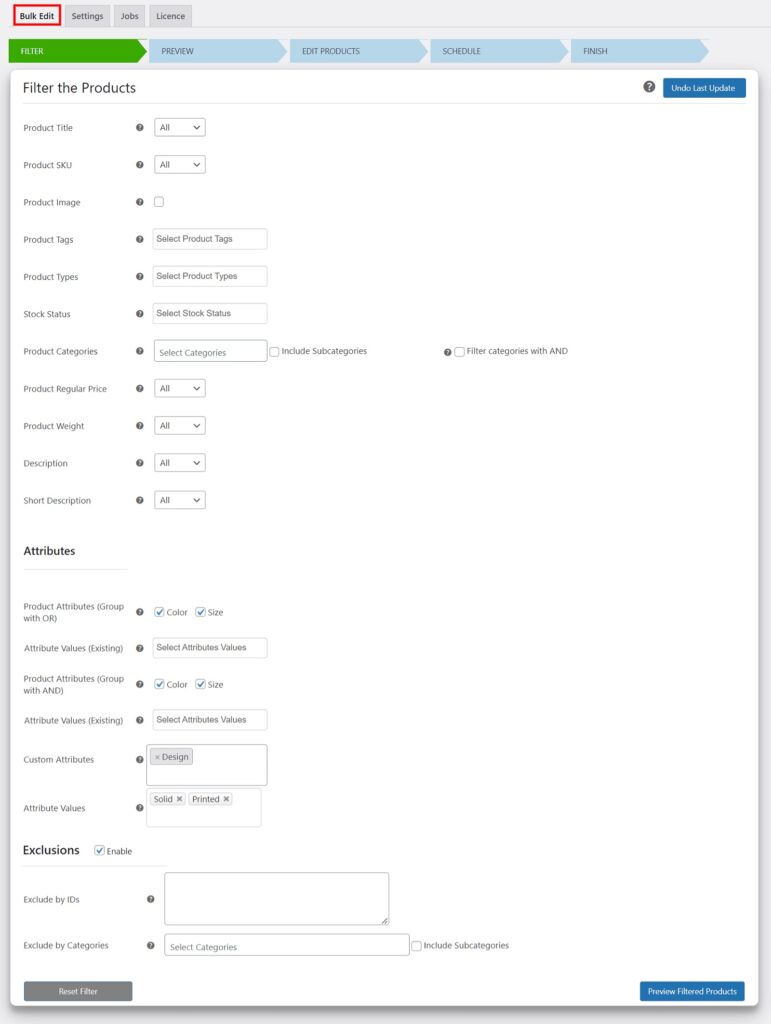
The basic process is outlined by the main tabs at the top of this process:
- Filter. Use this tool to restrict the set of products that you want to edit so that all the actions you perform afterward are applied only to those products.
- Preview. Gives you a chance to preview the set of products that meet your filter — a must-have if you want to avoid filtering mistakes.
- Edit Products. This is where you specify the edits that you want to apply. Again, this is a more capable tool than the default bulk edit tool, but that’s not saying a lot.
- Schedule. A nice feature that lets you save your update settings as a job that you can run and even re-run later. You can even edit the settings later if needed.
Not a bad plugin if the only thing you ever want to do is manually bulk edit product data, but again, we find it difficult to recommend a solution with such a narrow scope.
Price: $79 per year.
WooCommerce Product Bulk Edit Tools — Conclusion
In the end, your choice of tools for bulk editing WooCommerce products boils down to two simple questions. The first is: are you certain that the only thing you want to do is bulk edit WooCommerce products that are either a) already in your store database or b) that you intend to add manually?
If your answer to that question is “yes”, then you should start your shopping at the bottom of this list and work up. Every plugin we’ve described will let you bulk edit WooCommerce products, and the cheaper ones will cost you only $40 to $80 per year. Among those, it’s really a question of personal preference.
If you need to bulk edit more than just WooCommerce products, then start at the top and work down. But, here, ask yourself the second question: do you ever want to update your store from an external data source, such as a supplier? If the answer to that question is “yes”, then you have only one option. Only WP All Export/Import lets you bulk edit all types of data AND gives you complete control over the data import/export process. If you want to experience this firsthand, try their online sandbox at https://www.wpallimport.com/try/ and choose the WooCommerce Store option.
But if the answer to the second question is “no”, you’ve got a tough choice between WP Sheet Editor and the Smart Manager for WooCommerce. Both are good tools for manual, interactive editing, and they both have similar deficiencies. Again, it will likely boil down to personal preference.
Related Information
How to Bulk Edit WooCommerce and WordPress Data
How to Bulk Edit WooCommerce Products Using WP All Export/Import
How to Import and Export WordPress Users
How to Export and Import WordPress Categories and Tags
How To Import and Export Advanced Custom Fields (ACF) Data
How to Export and Import Gravity Forms Entries
How to Import and Export WooCommerce Customers
How to Export and Import WooCommerce Products
How to Export and Import Variable Products in WooCommerce
How to Import and Export WooCommerce Orders
Best WooCommerce Affiliate Plugins